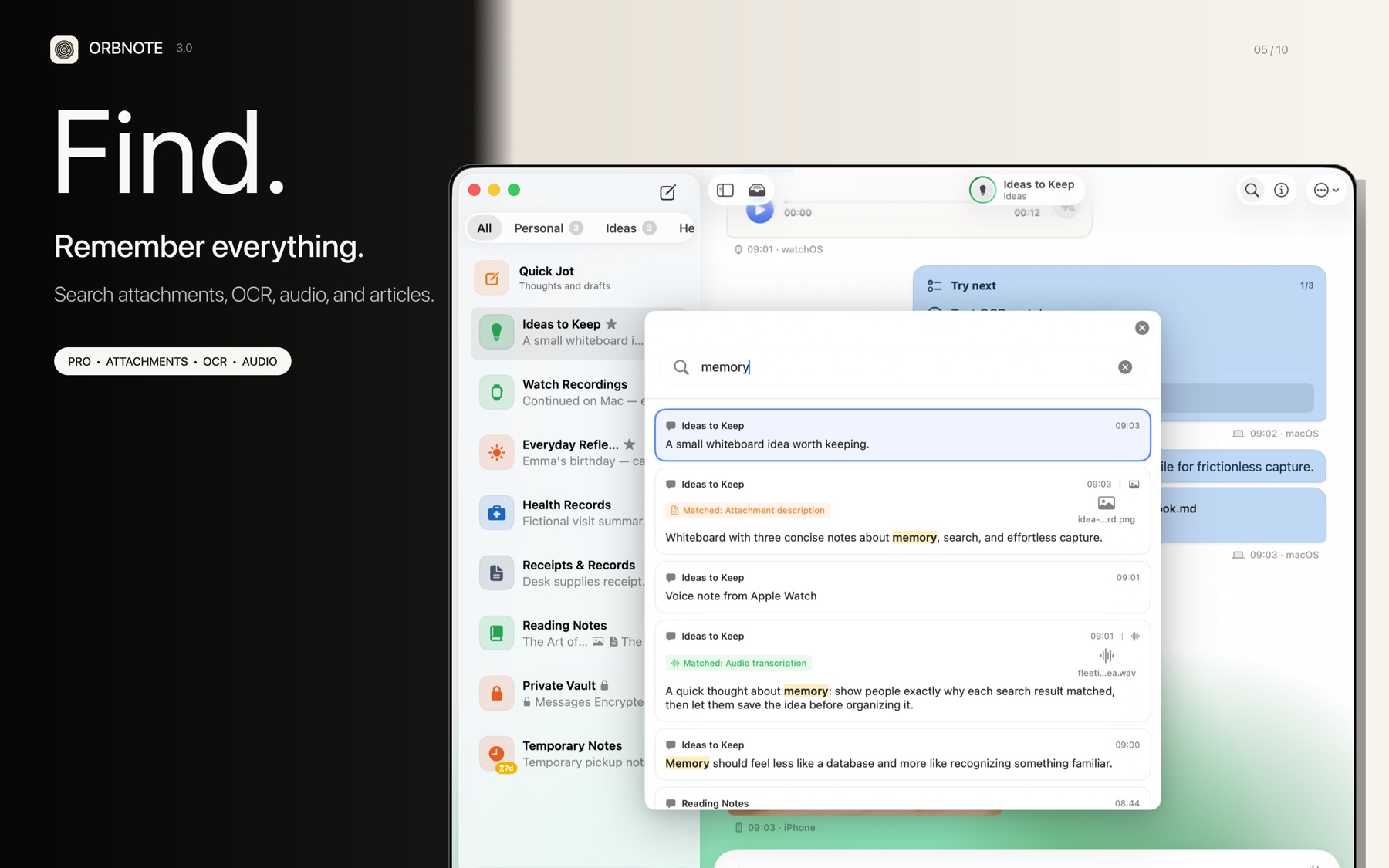
Global search lets you find content across all Threads without browsing each one. It is an OrbNote Pro feature.
Search scope
| Search target | Description |
|---|---|
| Message body | Text message content |
| Attachment text | File names and attachment metadata |
| Image OCR | Text recognized from images via the Vision framework |
| Voice transcripts | Transcript text generated by voice transcription |
| Article full text | Article content within long-text messages |
| Checklists | Text of checklist items |
Using search
- Press Cmd+F (macOS) to open search.
- Enter a keyword; results update in real time.
- Use arrow keys to navigate between results.
- Press Enter to jump to the selected message.
Search and privacy
Search results automatically exclude content from password-protected locked Threads:
- Content from locked Threads does not appear in search results.
- Only unlocked Thread content is included in search.
- This ensures sensitive content is not accidentally exposed during search.
Free vs. Pro
| User type | Search capability |
|---|---|
| Free user | Basic message content search |
| Pro user | Full-text search including attachment OCR, voice transcripts, and article full text |
For more on voice transcription and privacy, read Voice transcription and Thread password protection.